

How it works
To gain a clearer understanding of the underlying mechanics, it's helpful to think in terms of two distinct domains:
- The TresJS context, which represents our 3D scene.
- The physics layer, powered by Rapier, which governs the physical simulation.
Let's try to make a simple ball fall.
First step
Let's add 2 different meshes to our scene, a sphere representing the ball and a plane representing the floor.
<script setup lang="ts">
import { TresCanvas } from '@tresjs/core'
</script>

<template>
  <TresCanvas window-size>
    <TresPerspectiveCamera :position="[15, 15, 15]" :look-at="[0, 0, 0]" />
    <TresMesh name="ball" :position="[0, 8, 0]">
      <TresSphereGeometry :args="[1, 16]" />
      <TresMeshNormalMaterial />
    </TresMesh>
    <TresMesh name="floor" :position="[0, 0, 0]" :rotate-x="-Math.PI / 2">
      <TresPlaneGeometry :args="[20, 20, 20]" />
      <TresMeshBasicMaterial color="#f4f4f4" />
    </TresMesh>
  </TresCanvas>
</template>
Second step
Then we enable Rapier by adding the <Physics > component surrounding all the elements we want to be affected by physics, in this case, the ball and the floor.
Physics component needs to be wrapped by a Suspense component<script setup lang="ts">
import { TresCanvas } from '@tresjs/core'
import { Physics } from '@tresjs/rapier'
</script>
<template>
<TresCanvas window-size>
<TresPerspectiveCamera :position="[15, 15, 15]" :look-at="[0, 0, 0]" />
<Suspense>
<Physics>
<TresMesh name="ball" :position="[0, 8, 0]">
<TresSphereGeometry :args="[1,16]" />
<TresMeshNormalMaterial />
</TresMesh>
<TresMesh name="floor" :position="[0, 0, 0]" :rotate-x="-Math.PI / 2">
<TresPlaneGeometry :args="[20, 20, 20]" />
<TresMeshBasicMaterial color="#f4f4f4" />
</TresMesh>
</Physics>
</Suspense>
</TresCanvas>
</template>
Third step
To add forces (such as gravity) to our sphere, we need to wrap it with a <RigidBody /> component , which will generate a RigidBody instance containing one or many Colliders. These are responsible for all the physical calculations.
By default, the RigidBody type is Dynamic, which fits perfectly what we need for our ball. See all available types here
<script setup lang="ts">
import { TresCanvas } from '@tresjs/core'
import { Physics, RigidBody } from '@tresjs/rapier'
</script>

<template>
  <TresCanvas window-size>
    <TresPerspectiveCamera :position="[15, 15, 15]" :look-at="[0, 0, 0]" />
    <Suspense>
      <Physics>
        <RigidBody>
          <TresMesh name="ball" :position="[0, 8, 0]">
            <TresSphereGeometry :args="[1, 16]" />
            <TresMeshNormalMaterial />
          </TresMesh>
        </RigidBody>
        <TresMesh name="floor" :position="[0, 0, 0]" :rotate-x="-Math.PI / 2">
          <TresPlaneGeometry :args="[20, 20, 20]" />
          <TresMeshBasicMaterial color="#f4f4f4" />
        </TresMesh>
      </Physics>
    </Suspense>
  </TresCanvas>
</template>
Let's repeat the same process with the floor, the process is the same except that now we use the type Fixed instead indicating the body cannot move.
<template>
  <RigidBody type="fixed">
    <TresMesh name="ball" :position="[0, 0, 0]" :rotate-x="-Math.PI / 2">
      <TresPlaneGeometry :args="[20, 20, 20]" />
      <TresMeshBasicMaterial color="#f4f4f4" />
    </TresMesh>
  </RigidBody>
</template>
Now we need to make the bridge between the two worlds so that when our RigidBody instance gets updated, our sphere mesh will follow along.
Fortunately @tresjs/rapier abstracts most of the logic for you with a nice syntax, so you don't have to worry about making bounds or difficult configurations, even the colliders are set up for you automatically.
<script setup lang="ts">
import { TresCanvas } from '@tresjs/core'
import { Physics, RigidBody } from '@tresjs/rapier'
</script>

<template>
  <TresCanvas window-size>
    <TresPerspectiveCamera :position="[15, 15, 15]" :look-at="[0, 0, 0]" />
    <Suspense>
      <Physics>
        <RigidBody>
          <TresMesh name="ball" :position="[0, 8, 0]">
            <TresSphereGeometry :args="[1, 16]" />
            <TresMeshNormalMaterial />
          </TresMesh>
        </RigidBody>
        <RigidBody type="fixed">
          <TresMesh name="floor" :position="[0, 0, 0]" :rotate-x="-Math.PI / 2">
            <TresPlaneGeometry :args="[20, 20, 20]" />
            <TresMeshBasicMaterial color="#f4f4f4" />
          </TresMesh>
        </RigidBody>
      </Physics>
    </Suspense>
  </TresCanvas>
</template>
These physics are working, but the sphere is not behaving like a ball, it's not rolling through the floor, why is that?
You can inspect your physic scene using the debug prop in the <Physics> component you should see something like this:
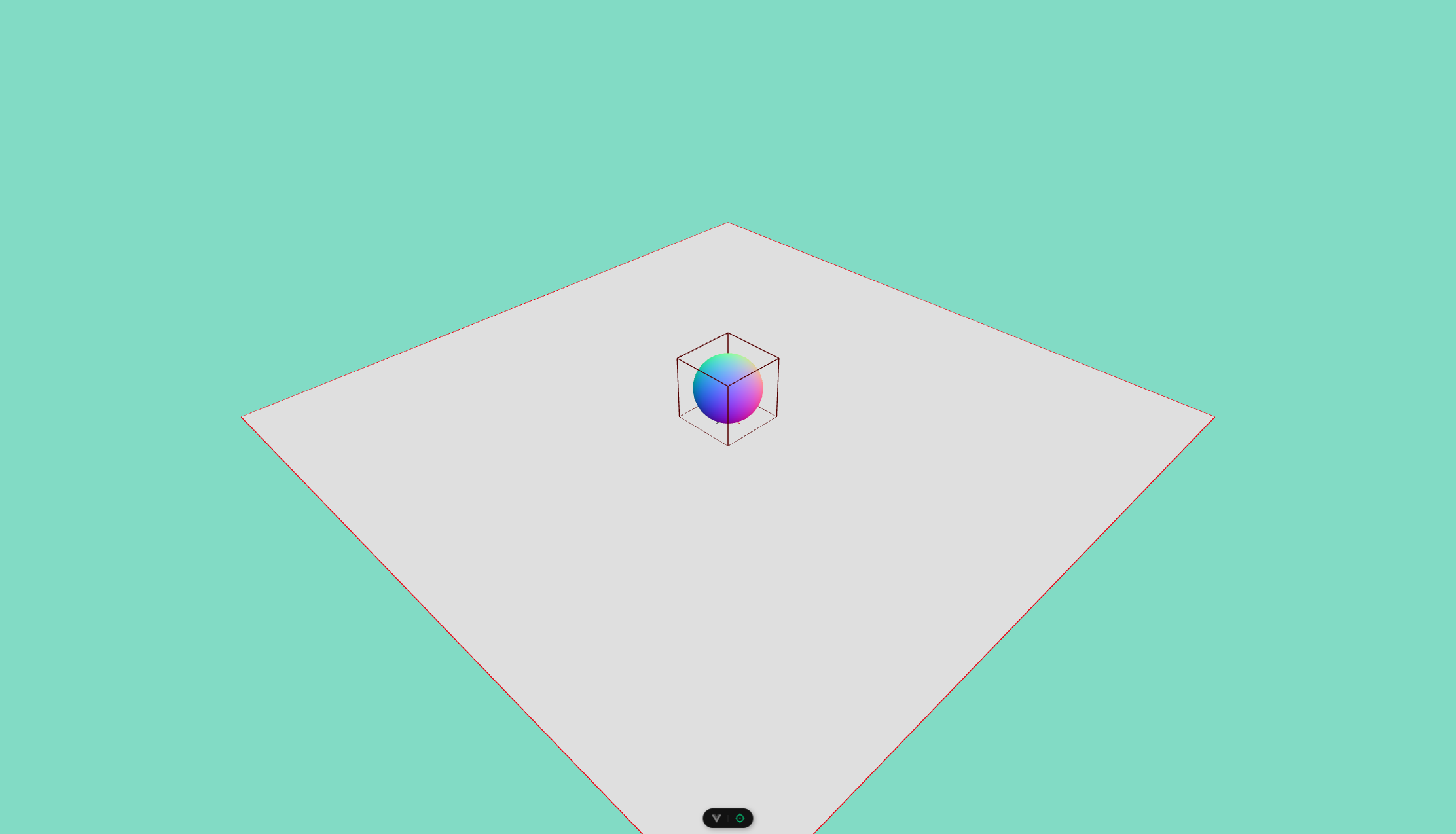
You'll quickly realize that our ball is wrapped by a cube, not a sphere, so let's introduce the Colliders
Colliders are physical objects with shape, properties, and methods, they are a child of the RigidBody component and a RigidBody can have one or many colliders. But we haven't created any, why did that collider appear there?
Well @tresjs/rapier will create an automatic collider for you, for each Mesh that you add! This normally is enough, but in cases like this, we need to tell our collider to have a sphere or ball shape.
<template>
  <RigidBody collider="ball">
    <TresMesh :position="[0, 8, 0]">
      <TresSphereGeometry :args="[1, 16]" />
      <TresMeshNormalMaterial />
    </TresMesh>
  </RigidBody>
</template>
Now our sphere finally acts like one 🏀!
Bonus: we can add a little of 0.5 will be fine restitution (which will make the rigidBody bounce)